
MySQL is a powerful relational database management system used globally for web applications, data storage, and enterprise solutions. Understanding how to navigate and manage databases is essential for developers and system administrators. The command mysql list all databases plays a key role in helping users quickly view every database available on a server, making it easier to manage and organise data structures efficiently.


When working in real environments, developers often need to check what databases exist before running queries or performing maintenance tasks. The mysql list all databases command provides a fast and reliable way to retrieve this information. Whether you are working on a local setup or a remote server, this command ensures you always have a clear overview of your database environment.
Understanding the mysql list all databases Command
The mysql list all databases command is one of the simplest yet most essential SQL operations. It is executed using the statement SHOW DATABASES; inside the MySQL environment. This command returns a structured list of all databases that the current user has permission to access, making it a fundamental tool for database exploration and management.
The behaviour of the mysql list all databases command depends heavily on user privileges. If you are logged in with limited access, you may only see a subset of databases. On the other hand, administrative users such as root can view all databases on the server. This makes permission control a critical aspect of MySQL security and administration.
How to Use mysql list all databases in Command Line
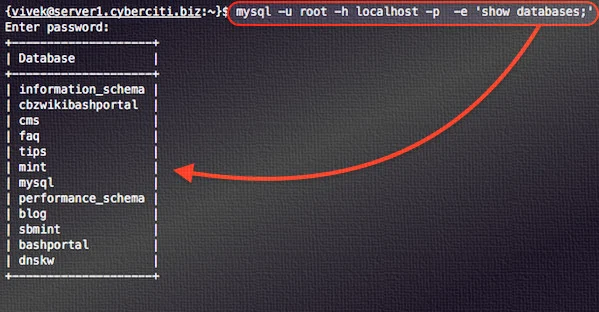
Using the mysql list all databases command in the command line is one of the most common methods for developers. First, you log into the MySQL server using credentials via terminal or command prompt. Once inside the MySQL shell, you simply type SHOW DATABASES; and press enter to retrieve the full list of available databases instantly.
The mysql list all databases command line method is especially useful for remote servers accessed through SSH. It is fast, lightweight, and does not require any graphical tools. Developers prefer this method because it provides direct control over the database environment, allowing them to execute commands efficiently without unnecessary complexity or interface limitations.
Alternative Methods for Listing Databases in MySQL
Although the mysql list all databases command is the most widely used method, MySQL also provides alternative approaches. One common alternative is SHOW SCHEMAS;, which performs exactly the same function. Additionally, advanced users can query the information_schema database to retrieve database metadata for more detailed analysis and filtering capabilities.
Graphical tools such as MySQL Workbench and phpMyAdmin also allow users to view databases visually. These interfaces are helpful for beginners or users who prefer a graphical environment over command-line operations. However, despite these alternatives, the mysql list all databases command remains the fastest and most widely used method among professionals.
Filtering Results Using mysql list all databases
In larger database environments, the output of the mysql list all databases command can become extensive. To make navigation easier, MySQL allows filtering using the LIKE clause. For example, SHOW DATABASES LIKE ‘shop%’; will display only databases that start with the word “shop,” making it easier to locate specific databases quickly.
The ability to filter results enhances the usefulness of the mysql list all databases command in professional environments. When managing hundreds of databases, filtering helps reduce clutter and improves efficiency. It allows developers to focus only on relevant databases, saving time and improving workflow accuracy during database administration tasks.
System Databases You Will Commonly Encounter
When you execute the mysql list all databases command, you will notice several default system databases. These include information_schema, mysql, performance_schema, and sys. Each of these plays an important role in MySQL’s internal functioning, handling metadata, user permissions, performance tracking, and system-level data management.
These system databases are automatically created during MySQL installation and are essential for server operations. The mysql list all databases command displays them because they are part of the database ecosystem. Understanding their purpose helps users differentiate between system databases and user-created ones, improving overall database comprehension and control.
Troubleshooting mysql list all databases Issues
Sometimes users may notice that the mysql list all databases command does not show all expected databases. This is usually caused by permission restrictions. MySQL only displays databases that the current user has access to, meaning some databases remain hidden unless proper privileges are granted.
To resolve this issue, users should check their permissions using SHOW GRANTS;. If necessary, switching to a root or administrative account can help reveal all databases. Once proper permissions are in place, the mysql list all databases command will display the complete and accurate list of databases available on the server.
Best Practices for Managing MySQL Databases
Using the mysql list all databases command effectively is only part of good database management. Developers should also follow best practices such as maintaining clear naming conventions, organising databases logically, and regularly removing unused or outdated databases. This helps ensure a clean and efficient database environment.
Security is another important aspect of database management. Limiting user privileges ensures that only authorised individuals can view or modify databases. The mysql list all databases command should be used responsibly within secure environments to prevent unauthorised access and maintain data integrity across systems.
Advanced Usage of mysql list all databases Command
Advanced users often integrate the mysql list all databases command into scripts for automation purposes. For example, executing mysql -u user -p -e “SHOW DATABASES;” allows users to retrieve database lists directly from the terminal without entering the MySQL shell manually. This is particularly useful for automation and monitoring tasks.
In DevOps environments, the mysql list all databases command is frequently used in combination with shell scripts and cron jobs. This enables automated backups, system checks, and reporting. By leveraging this command in scripts, administrators can significantly improve efficiency and reduce manual workload in large-scale database systems.
Importance of mysql list all databases in Real Projects
In real-world applications, the mysql list all databases command is essential for developers, testers, and administrators. It provides instant visibility into the database environment, allowing teams to understand what resources are available before performing development or maintenance tasks. This ensures better planning and execution of database operations.
From small websites to enterprise-level applications, the mysql list all databases command remains a core tool in daily workflows. It supports debugging, migration planning, and system audits. Its simplicity and effectiveness make it one of the most frequently used commands in MySQL-based environments across industries.
Conclusion
The mysql list all databases command is a fundamental tool for anyone working with MySQL. It provides a simple yet powerful way to view all available databases and plays a key role in database management and administration. Whether used in command line or scripts, it ensures complete visibility of the database environment.
Mastering the mysql list all databases command helps improve efficiency, organisation, and control over data systems. From beginners to advanced administrators, this command remains an essential part of MySQL operations, enabling smooth workflow and effective database handling in both development and production environments.
